Graham Mayor
... helping to ease the lives of Microsoft Word users.
 |
 |
 |
Many people access the material from this web site daily. Most just take what they want and run. That's OK, provided they are not selling on the material as their own; however if your productivity gains from the material you have used, a donation from the money you have saved would help to ensure the continued availability of this resource. Click the appropriate button above to access PayPal.
Insert a date other than today's date
Dates may be inserted into Word documents by a variety of methods, the two principle ones being:
The 'Insert > Date' tool - which inserts the current date as text, or as a field which displays the system date (pity Microsoft didn't think to use this to insert the far more useful CREATEDATE field).
Insert a date field (ALT+SHIFT+D), or one of the more specialized alternatives: CREATEDATE, PRINTDATE, SAVEDATE, TIME.
But what if you want to insert a date other than today's date? What if you want to display a date 14 days from today (or 7 days earlier)?
You might think a simple field calculation of DATE + 14 might do the trick, but try this:
{={Date} + 14}
or
{={Date \@ "dd MMM yyyy"} - 7} and all you'll manage is an error message.
You can produce a result of sorts by using {={Date \@ "dd"}+14} and this will add 14 to the 'day' part of today's date, but try it in the last couple of weeks of the month and you'll quickly see the snag. The 44th of October might raise a few eyebrows.
It is possible to construct a field combination that will provide the required result, but it is so complex that you will not want work it out for yourself. Fortunately the work has been done for you by fellow Word MVP Paul Edstein and is available for download from this site at Third Party Downloads where you will find an assortment of date calculations you can use or adapt. This really is a superb piece of work and an object lesson in what can be done with date fields.
Staying with the example of today plus 14 days, the code required for the task is reproduced as follows. For ease of understanding each line is separated by a line break: -
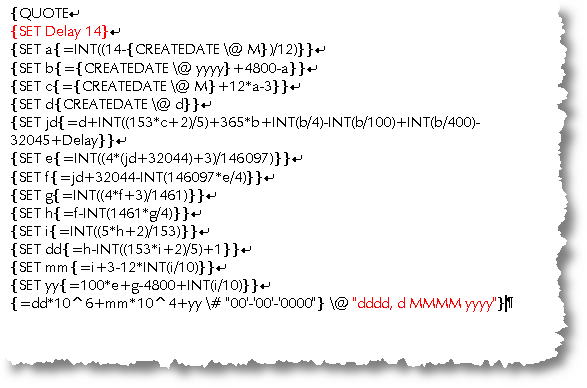
The original field construction as shown in the linked article, uses a DATE field. I have changed this to a CREATEDATE field, which I suspect most closely reflects the real world use of such a calculation. The parts shown in red are the delay (14 days - which could equally be a negative number for a date before today) and the format of the finished date as displayed in the document.
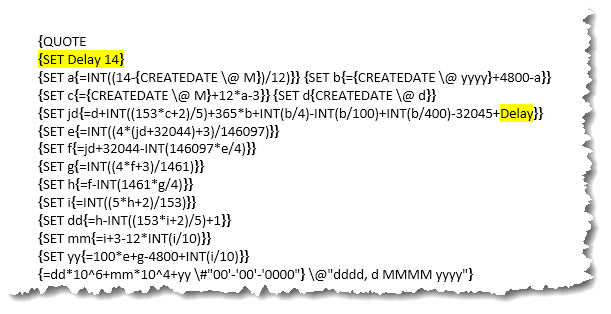
Note that the code only allows one delay in a document. If you want to use the field construction to have different delays for different dates in the document, you must change the bookmark name 'Delay' shown highlighted in yellow below for each calculated date e.g. 'Delay1', 'Delay2' etc.
A simpler solution may be to use a macro to place the date. The following was written to provide a wide range of flexibility. The default (which you can change) is set at 14 days in the future, but you can insert and number, including negative numbers, to insert a date counted from that number before or after today's date.
Macro
Watch out for prematurely split lines when pasting the following code into the macro editor.
' Written by Graham Mayor and posted on the word.docmanagement newsgroup in
' March 2000
' Inserts a future date in a document - note that this is not a field
' Some style revisions and error handler by Charles Kenyon
Dim Message As String
Dim Mask As String
Dim Title As String
Dim Default As String
Dim Date1 As String
Dim MyValue As Variant
Dim MyText As String
Dim Var1 As String
Dim Var2 As String
Dim Var3 As String
Dim Var4 As String
Dim Var5 As String
Dim Var6 As String
Dim Var7 As String
Dim Var8 As String
'Date mask belowincludes non-breaking spaces (Chr(160))
Mask = "d" & Chr(160) & "MMMM" & Chr(160) & "yyyy" ' Set Date format
Default = "14" ' Set default.
Title = "Plus or minus date starting with " & Format(Date, Mask)
Date1 = Format(Date, Mask)
Var1 = "Enter number of days by which to vary above date. " _
& "The number entered will be added to "
Var2 = Format(Date + Default, Mask) ' Today plus default (14)
Var3 = Format(Date - Default, Mask) ' Today minus default (14)
Var4 = ". The default ("
Var5 = ") will produce the date "
Var6 = ". Minus (-"
Var7 = ". Entering '0' (zero) will insert "
Var8 = " (today). Click cancel to quit."
MyText = Var1 & Date1 & Var4 & Default & Var5 & Var2 & Var6 _
& Default & Var5 & Var3 & Var7 & Date1 & Var8
' Display InputBox and get number of days
GetInput:
MyValue = InputBox(MyText, Title, Default)
If MyValue = "" Then
End 'quit subroutine
End If
On Error GoTo Oops 'just in case
Selection.InsertBefore Format((Date + MyValue), Mask)
Selection.Collapse (wdCollapseEnd)
End 'End subroutine
Oops: ' error handler in case user types something other than a number
MsgBox Prompt:="Sorry, only a number will work, please try again.", _
Buttons:=vbExclamation, _
Title:="A number is needed here."
GoTo GetInput
End Sub
Date calculations
For all you need to know about manipulation Word date fields, see the tutorial by fellow Word MVP Paul Edstein available for download from this site at Third Party Downloads.
There you will find an assortment of date calculations you can use or adapt. This really is a superb piece of work and an object lesson in what can be done with date fields.
While in the downloads section, take a look also at Paul's excellent tutorial on Field Calculations.