Graham Mayor
... helping to ease the lives of Microsoft Word users.
 |
 |
 |
Many people access the material from this web site daily. Most just take what they want and run. That's OK, provided they are not selling on the material as their own; however if your productivity gains from the material you have used, a donation from the money you have saved would help to ensure the continued availability of this resource. Click the appropriate button above to access PayPal.
Simple extraction of data from a series of similar Word documents
A user in a Word forum recently came up with a requirement to extract information from a series of letters (similar to that below) all set aside in the same folder, into a data file.
Create a separate folder for the purpose of storing the documents to be processed.
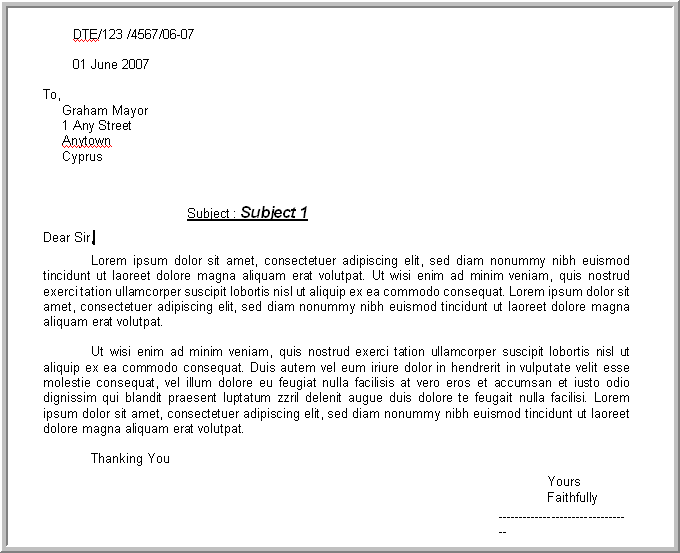
The data required is the number beginning DTE at the start of the letter and the content of the Subject line. The following is a method I came up with to achieve that.
Start by creating a new document to gather the data, containing a table with one header row.

Save and close the document. The name is unimportant as long as it can be readily identified. For the purpose of this exercise I have used the name "D:\My Documents\Test\DTE data.doc".
The macro opens each letter in a folder selected by the user, searches for the two strings and assigns them to variables. The data document is then opened, the found strings are edited and written into the next row of the table. The data document is then saved and closed and the next letter opened - this is repeated for each Word document in the folder. Clearly this is only going to work if all the documents have the same format.
For extracting data from protected forms, see Extract Data From Forms
Dim sDTE As String
Dim sSubject As String
Dim strFileName As String
Dim strPath As String
Dim oDoc As Document
Dim dataDoc As Document
Dim fDialog As FileDialog
Set fDialog = Application.FileDialog(msoFileDialogFolderPicker)
'Pick the folder with the letters
With fDialog
.Title = "Select Folder containing the documents to be modifed and click OK"
.AllowMultiSelect = False
.InitialView = msoFileDialogViewList
If .Show <> -1 Then
MsgBox "Cancelled By User"
Exit Sub
End If
strPath = fDialog.SelectedItems.Item(1)
If Right(strPath, 1) <> "\" Then strPath = strPath + "\"
End With
'Close any open documents
If Documents.Count > 0 Then
Documents.Close SaveChanges:=wdPromptToSaveChanges
End If
strFileName = Dir$(strPath & "*.do?")
'Assign the name of the document to take the data
Documents.Open ("""D:\My Documents\Test\DTE data.doc""")
Set dataDoc = ActiveDocument
'Open the letters in turn
While strFileName
Set oDoc = Documents.Open(strPath & strFileName)
Selection.HomeKey wdStory 'Start from the top of the letter
With Selection.Find
'find the first string
.ClearFormatting
Do While .Execute(findText:="DTE/*^13", _
MatchWildcards:=True, _
Wrap:=wdFindStop, Forward:=True) = True
'Assign the found text to a variable and chop off 'the last character - '¶'
sDTE = Left(Selection.Range, Len(Selection.Range) - 1)
Loop
End With
Selection.HomeKey wdStory 'Start from the top of the letter
With Selection.Find
'find the second string
.ClearFormatting
Do While .Execute(findText:="Subject :*^13", _
MatchWildcards:=True, _
Wrap:=wdFindStop, Forward:=True) = True
'Assign the second string to a variable and chop off 'the last character and the leading text
sSubject = Mid(Selection.Range, 10, Len(Selection.Range) - 10)
Loop
End With
'Switch to the data document and add the content of
'the variables to the blank row of the table
dataDoc.Activate
With Selection
.EndKey wdStory
.MoveUp Unit:=wdLine, Count:=1
.MoveRight Unit:=wdCell, Count:=2 'Add a new blank row
.TypeText Text:=sDTE
.MoveRight Unit:=wdCell
.TypeText Text:=sSubject
End With
'Close the letter without saving
oDoc.Close SaveChanges:=wdDoNotSaveChanges
Set oDoc = Nothing
strFileName = Dir$()
Wend
'Save the data document
dataDoc.Save
End Sub
The End Result
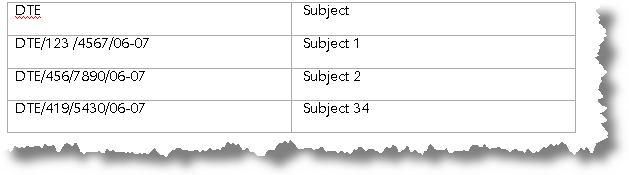
Extract Data
The method described on this page can be adapted to a variety of data collection scenarios.