Graham Mayor
... helping to ease the lives of Microsoft Word users.
 |
 |
 |
Many people access the material from this web site daily. Most just take what they want and run. That's OK, provided they are not selling on the material as their own; however if your productivity gains from the material you have used, a donation from the money you have saved would help to ensure the continued availability of this resource. Click the appropriate button above to access PayPal.
Using Office 2003 proofing tools, with Word 2007
This method does not work with Word 2010!
Office is supplied with a limited set of proofing tools, the choice of which depends on the region where the product is sold.
Additional proofing languages must be bought separately. However for those users who upgrade from Office 2003 and who had purchased the Office 2003 proofing tools set, if you use the facility in the Office 2007 setup routine to upgrade Word 2003, then the additional Office Proofing Tools will be retained and the proofing tools will work much as they did before (albeit with a few anomalies listed later).
If you have uninstalled Office 2003, including its proofing tools, it is possible to add them back after Office 2007 has been installed.
To do this install Office from the Office 2003 installation disc and select a Custom Install
Clearly if you wanted to keep Office 2003 applications, such as Word 2003, alongside Office 2007 (see https://www.gmayor.com/Toolbars_in_word_2007.htm ) then you should not have uninstalled Office, but allowed the Office 2007 installation routine to take account of your preference.
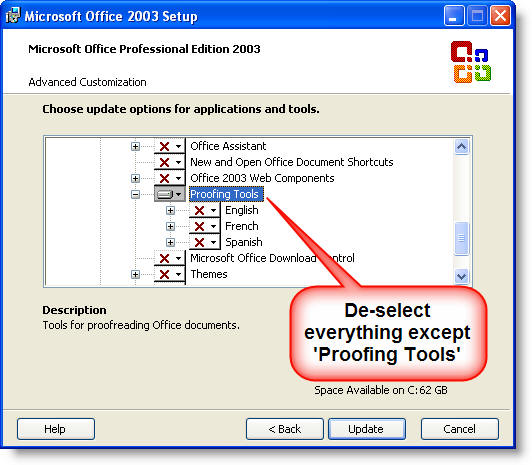
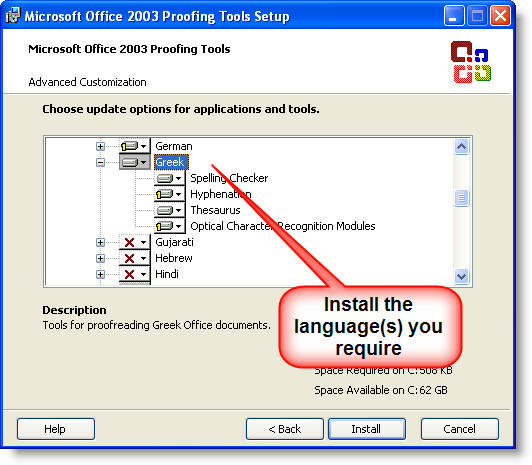
Next, install the Office 2003 proofing tools:
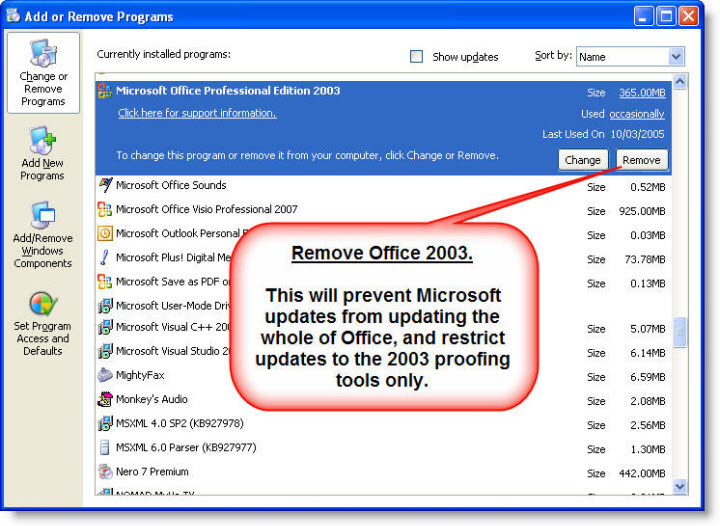
Now remove Office 2003 from the Windows Control Panel, Add or Remove Programs applet. This will prevent Microsoft Updates from updating the whole of Office.
Open Word 2007 (or any other Office 2007 application). This will integrate the Office 2003 proofing tools into the Office 2007 application.
Compatibility issues
The 2003 proofing tools are not 100% compatible with Office 2007, and for Word 2007, the issues are listed in the following table. There are complementary issues on the other Office applications also. These are listed on Microsoft's Office support web site..
Language |
Word's spell check issues |
| Arabic | |
| Basque | The spell checker cannot add the word to the custom dictionary. |
| Brazilian | |
| Bulgarian | |
| Catalan | |
| Croatian | |
| Czech | Grammar errors are not found. |
| Danish | |
| Dutch | |
| Estonian | Hyphenation does not function. |
| Finnish | |
| French | Grammar errors are not found. |
| Galician | |
| German | Grammar errors are not found. Hyphenation does not function. |
| Greek | |
| Gujurati | |
| Hebrew | |
| Hindi | |
| Hungarian | Hyphenation does not function. |
| Icelandic | |
| Indonesian | |
| Irish | |
| Italian | Grammar errors are not found. |
| Kannada | |
| Latvian | |
| Lithusanian | |
| Marathi | |
| Norwegian (Bokmal) | |
| Norwegian (Nyorsk) | |
| Polish | Grammar errors are not found. |
| Portuguese | |
| Punjabi | |
| Romanian | Hyphenation does not function. |
| Russian | |
| Serbian (Cyrillic) | The spell checker does not give spelling suggestions. Hyphenation does not function. |
| Serbian (Latin) | |
| Slovak | |
| Slovenian | |
| Spanish | Grammar errors are not found. |
| Swedish | |
| Tamil | |
| Telegu | |
| Thai | |
| Turkish | Hyphenation does not function. |
| Ukranian | The spell checker cannot add the word to the custom dictionary. |
| Vietnamese | |
| Welsh |
For those without the Word 2003 proofing tools, additional languages were provided by the Office 2007 Language Packs which you could purchase on line, but I believe that these are no longer available. Office 2010 language packs are however available for that product.
Office proofing tools
If you work in Word with several languages, you probably will need to employ the Office proofing tools fro those languages. If you have already purchased the language packs for Office 2003, you would probably feel a tad miffed if you had to buy them again for the new version. You can however use the 2003 proofing tools in Office 2007. This page explains how.
Sadly this method does not work with Office 2010.