Graham Mayor
... helping to ease the lives of Microsoft Word users.
 |
 |
 |
Many people access the material from this web site daily. Most just take what they want and run. That's OK, provided they are not selling on the material as their own; however if your productivity gains from the material you have used, a donation from the money you have saved would help to ensure the continued availability of this resource. Click the appropriate button above to access PayPal.
Customize the Word 2000/2003 File Operations Places Bar
In the file operations windows (File > Open; File > Save) Word offers a pre-configured Places Bar with five places where you might want to store documents. These places can be personalized, and, by reducing the size of the icons, the number may be increased. Thus, for example, you might wish to add the documents folder on a local networked laptop; or, if you make frequent edits to templates, your templates folder.
Word 2002/3 provide the tools to simply add your own entries - see illustration below - but you lose this functionality if you edit the XP Places Bar to remove the default entries.
You can however hide the entries by editing the registry to set a dword entry named Show with a value of '0' (as described later for Word 2000) against each key you wish to hide. This prevents you from changing the order of the displayed links, but provides more real estate.
Word 2000 lacks the tools to simply add entries, so the only option is to edit the registry.
Here you are limited to 10 such entries, so you may prefer to remove some of those provided to make room for your own.
If you are not comfortable with directly editing an essential system file in which inadvisable changes can render your PC inoperative, then read no further.
You can make the changes while running Word, but do NOT have a Word file operation window open then....
Run regedit (Windows > Start > Run > Regedit). Find and select the following key in the left Windows Explorer-like window:
HKEY_CurrentUser\Software\Microsoft\Office\9.0\Common\Open Find\Places
From the 'registry' menu, 'export registry file' (in case things go wrong, whereupon you can delete the mistakes and restore the exported file.). I suggest you set the export file type as Regedit 4 as this format is readable in a text editor.
Click the right window and create a new DWORD value named ItemSize with a value of 0.
This will set the icons to small.
Next go to:
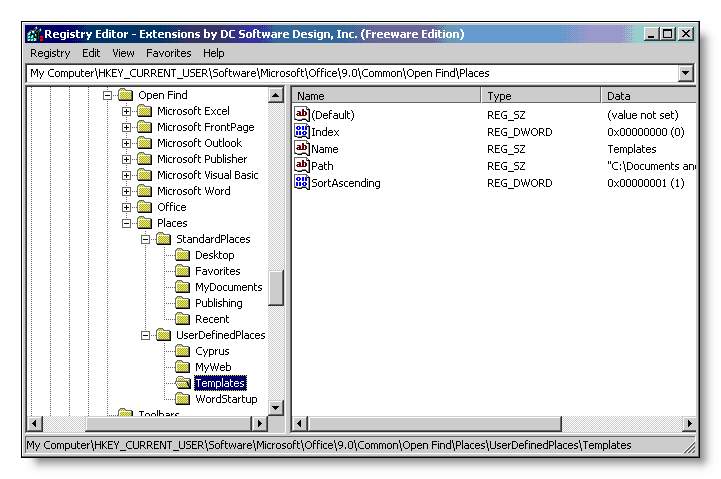
HKEY_CurrentUser\Software\Microsoft\Office\9.0\Common\Open Find\Places\UserDefinedPlaces
This key should be empty. Right click in the *left* window and create a new subkey. You can either name it to reflect what it does - in this example Templates - or call it by some unique nondescript generic name such as Place1, Place2 etc.
Against that new subkey in the right pane, you need to add four new values:
| Name | Templates |
| Path | "C:\Windows\Application Data\Microsoft\Templates" |
| SortAscending | DWORD 1 |
| Index | DWORD 0 |
where 'Name' is a string value with the text of the caption you wish to appear in the Places bar and 'Path' is a string value with the path to the location you wish to add - here the templates folder surrounded by inverted commas i.e. "c:\pathname".
Index will be incremented by 1 for each addition you make.
Change the details above to reflect your own requirements.
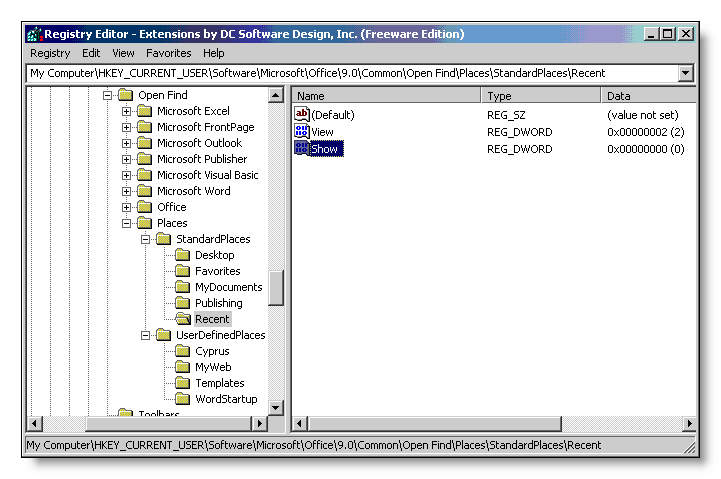
If you want to disable one or more of the default keys, don't delete them from HKEY_CURRENT_USER\Software\Microsoft\Office\9.0\Common\Open Find\Places\StandardPlaces but create a DWORD value named 'Show' for each and set its value to 0 to hide the icon or 1 to display it.
If all this seems too complicated then you may like to consider a freeware utility from 'The Zjooj' web forum, which performs all the donkey work for you.