Graham Mayor
... helping to ease the lives of Microsoft Word users.
 |
 |
 |
Many people access the material from this web site daily. Most just take what they want and run. That's OK, provided they are not selling on the material as their own; however if your productivity gains from the material you have used, a donation from the money you have saved would help to ensure the continued availability of this resource. Click the appropriate button above to access PayPal.
Avoiding unwanted capitalization
Word is configured, by default, to automatically capitalize sentences, but this often produces unwanted results - such as
cc:
being converted
to
Cc:
The obvious thing to do, is to use CTRL+Z (undo) to change it back again, but this is provided you notice the change.
You could also turn off the capitalization, but that's a bit like cutting off your nose to spite your face.
There is a third option detailed below, so simple that I wonder why it was missed for so long. Thanks to Cheryl Flanders for reminding that simplest is often best
Autocorrect
Display the hidden formatting characters, to ensure that you capture only the bits that you actually require, and type cc: followed by a TAB, (if required).

Restore the unwanted capitalization with CTRL+Z, then select the required text (and the TAB if required) but NOT the paragraph mark.

From the tools menu select Autocorrect (or Autocorrect Options depending on Word version). The selection will automatically be pasted into the 'With' section of the dialog box as shown below:
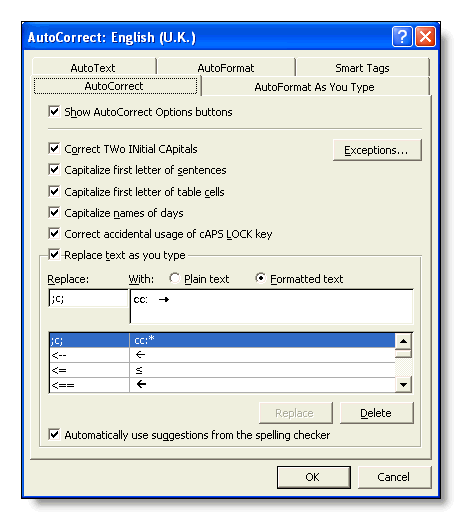
If the Formatted Text radio button is not selected, then select it. This is not required if you don't want the TAB included.
In the 'Replace' section of the dialog box enter ;c; as shown above.
The second semi-colon is used instead of the space that would normally be used to activate the autocorrect entry - any punctuation character could be used, but this one will be appreciated by touch typists.
The first semi-colon followed by c is all that is required if you do not need the tab (as in the second example shown below).
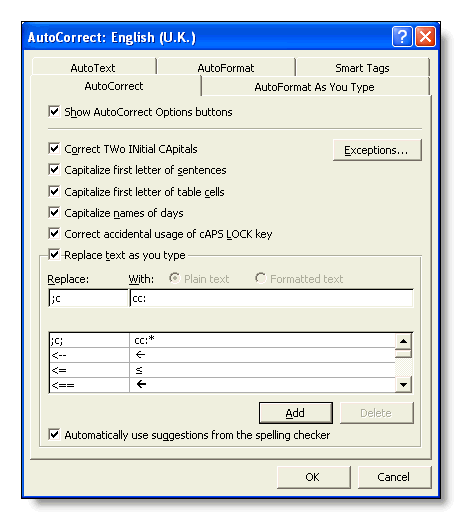
It is only a small mental adjustment to the use of ;c; or ;c in place of cc: to enter the required text without the action of the auto-capitalization to screw things up.
A neat use of autocorrect
Using autocorrect to fix a problem related to automatic capitalisation.