Graham Mayor
... helping to ease the lives of Microsoft Word users.
 |
 |
 |
Many people access the material from this web site daily. Most just take what they want and run. That's OK, provided they are not selling on the material as their own; however if your productivity gains from the material you have used, a donation from the money you have saved would help to ensure the continued availability of this resource. Click the appropriate button above to access PayPal.
User/Workgroup Templates Template Locations
From version 2000 Microsoft changed the way Word's default installed document templates were stored. The standard templates appear to be stored as files in a sub folder of \Program Files\Microsoft Office\Templates which will vary according to language. However these can not simply be manipulated with filing system commands, nor will any personal templates filed in this location be recognized by Word. Delete the files and Word will replace them.
If you need to add to, or remove items from the collection of standard templates, then the only way to do so is through Word's setup, accessed via Windows Control Panel > Add or Remove programs. The following illustrations show the procedure for Office 2003, but the earlier versions are essentially similar:
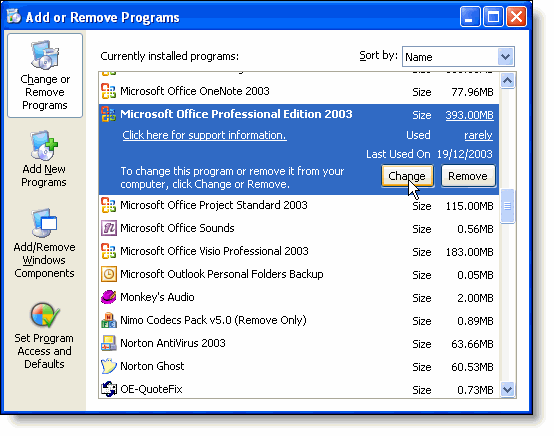
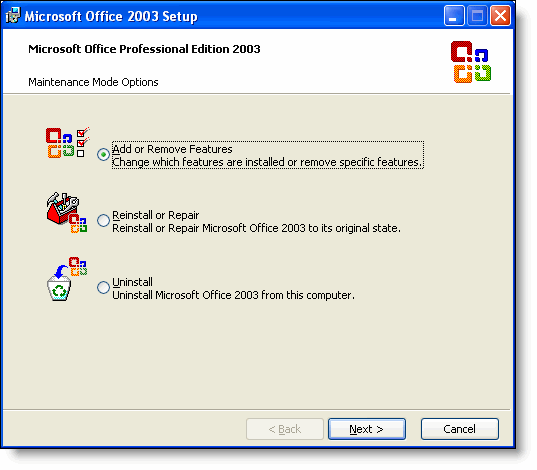
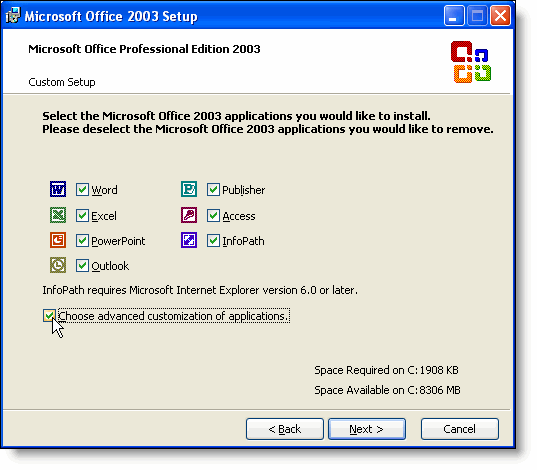
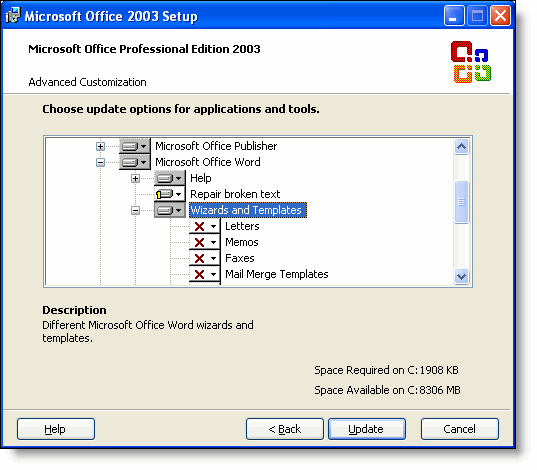
The standard templates supplied with Word are of little use to most people, so to remove clutter uninstall the standard templates as shown in the above illustration, or use them as a basis for your own personalised templates..
User Templates
Word can store personal document templates in one of two locations - User Templates and Workgroup Templates, the locations of which are defined in tools > options > file locations (see illustration below, where the default location has been changed to a folder on my data drive).
Additionally Word will *load* automatically any template or add-in in the Word startup folder or the Office startup folder. The former is defined in file locations, the latter will be at \Program Files\Microsoft Office\Office11\Startup.
11 here is the location for files for Office 11 i.e. Office 2003. For Office 2002 this would be Office 10, and for Office 2000 just Office on its own.
This can cause some confusion after upgrading, when add-ins using that folder (e.g. Adobe Acrobat) no longer appear to work.
Word simply no longer sees the add-ins in the startup folder of the earlier version. Allowing Word's setup routine to perform the upgrade should cause the add-ins to be moved, but if add-ins fail to load after an upgrade this is the first place to look.
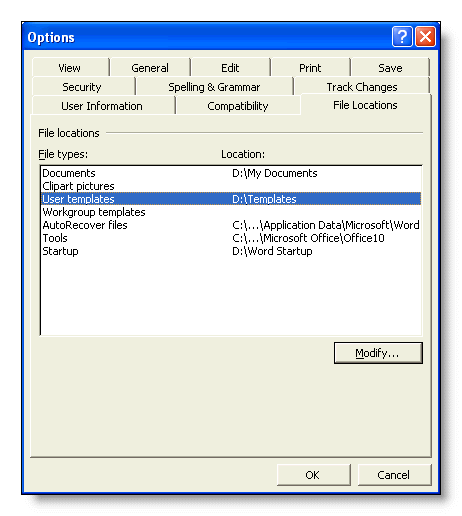
By pointing their versions of Word to the same Workgroup and Startup folders you can make document templates and add-ins available to users on a network.
DO NOT BE TEMPTED TO SHARE THE NORMALTEMPLATE!
Normal.dot is a personal 'scratch pad' that contains user preferences and is constantly accessed while working. Template corruption caused by attempting to share this file can stop the whole user base from working. Some IT departments also replace this essential file at l og-in in an effort to control user standards. This too is completely unnecessary. It causes low staff morale amongst experienced Word users and doesn't prevent weaker users from screwing things up.
Impose corporate standards by using document templates and train the staff to use them.
You can create your own tabs on the file > open menu by making sub folders to the Workgroup and/or User template folders. If these sub folders have the same names at each location, then templates placed in either will appear under the same tab.
The tabs will only appear if the folders so named actually contain templates.
Thus it should be fairly simple to separate business and personal templates by using appropriate folder names. Any template saved in the top level User or Workgroup folders will appear under the 'General' tab.

Sharing templates
This page is aimed at older Word versions prior to 2007, but the general principles remain valid.