Graham Mayor
... helping to ease the lives of Microsoft Word users.
 |
 |
 |
Many people access the material from this web site daily. Most just take what they want and run. That's OK, provided they are not selling on the material as their own; however if your productivity gains from the material you have used, a donation from the money you have saved would help to ensure the continued availability of this resource. Click the appropriate button above to access PayPal.
Remove the password from a document protected for forms
Word 2003
Word documents protected for forms are not secure. You may not be able to readily discover the password, but you can easily remove it in Word 2003 using the script editor or by using the method shown later on this page.
Open the document in Word 2003 then press ALT+SHIFT + F11. The document will be opened in the script editor and will look something like:
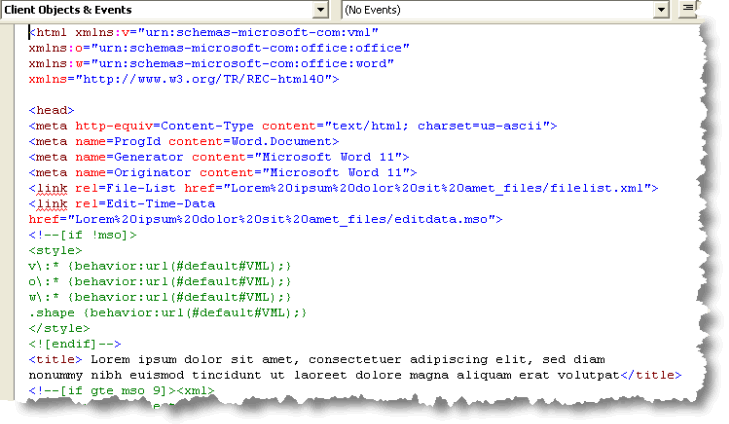
From the edit menu - select FIND and search for 'password'.
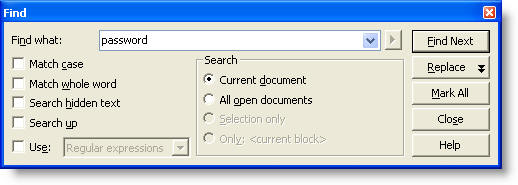
The search routine will take you to the area of the document where the password is stored -
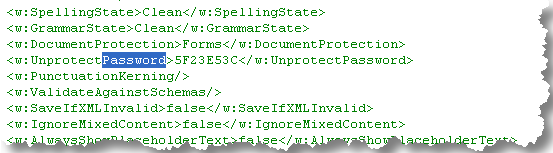
The bit we are interested is the unique sequence of digits in the middle of that line, highlighted below in red.
<w:UnprotectPassword>5F23E53C</w:UnprotectPassword>
If you may need to replace the original password later, make a note of the sequence of digits before overwriting with zeros.
Overwrite the red digits with zeros. <w:UnprotectPassword>00000000</w:UnprotectPassword>
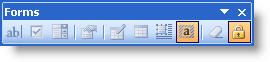
Save the document from the script editor. Close the editor and you can unlock the fields without the original password from the forms toolbar
Alternative method - all Word versions
There is no script editor in Word 2007 or above, so the above method will not work in that version.
An alternative method that will work in Word 2007/2010 (and also in earlier versions, but without the possibility of restoring the original unknown password) is to open a new blank document then insert the form into that document.
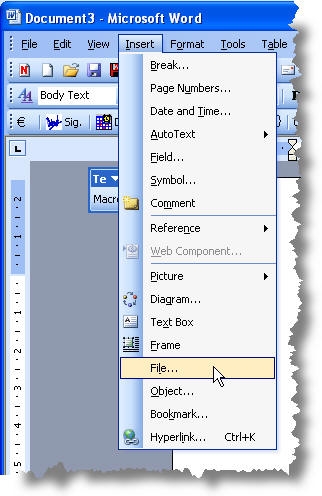
Word versions before 2007 - Insert > File
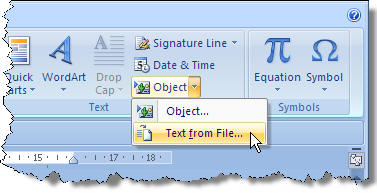
In Word 2007/2010 - Insert Tab - Object > Text from File
This will produce a copy of the form without the protection. You can then make your changes and re-protect the new form before saving it.
There will be a strong likelihood of formatting differences between
the copy and the original form, if the form was created from a different template from the
Normal template used to create the blank document. For example, the form may have different
margin settings from those in the Normal template. The copy will thus adopt the margins
of the Normal template and not those of the inserted form.
Whilst the original is protected there is no access to Page Setup, so it is not possible to
simply read the settings from the original form and transfer them. Be prepared for
some reformatting to match the original by eye!
Passwords
If passwords were easy to remove, it would be pointless using them.
When you password protect a document against opening, then that document is encrypted and you will not be able to open it without the original password
There are lots of people out there who purport to be able to crack passwords, but Word's protection is pretty good and does not come with any back doors, so while you can break the password eventually by trial and error using software that will try all possible examples, a suitably strong password will take a seriously long time to break.
There is an example of such software listed on the favourites page of this site. Then you have the dilemma of whether to offer your credit card details to someone who cracks passwords for a living.