Graham Mayor
... helping to ease the lives of Microsoft Word users.
 |
 |
 |
Many people access the material from this web site daily. Most just take what they want and run. That's OK, provided they are not selling on the material as their own; however if your productivity gains from the material you have used, a donation from the money you have saved would help to ensure the continued availability of this resource. Click the appropriate button above to access PayPal.
Read a pre-formatted HTML document into the body of an Outlook message
Sometimes people may wish to invite clients to refer to a document stored on an on-line resource by sending a formatted e-mail invitation, or include a formatted message body in an e-mail message. In the following example, I first prepared a simple document using an HTML editor - any suitable HTML editor will do the job) and saved it to my hard drive - for the purposes of experimenting with this technique, the sample e-mail is also available to download.
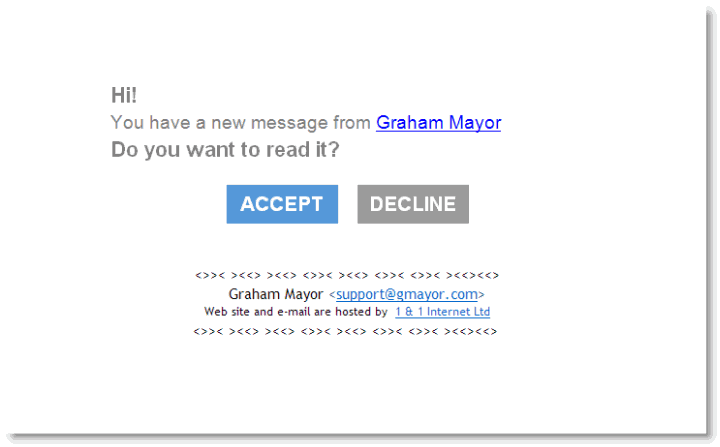
The 'Accept' button is hyperlinked to a sample PDF file on my web site and the 'Decline' button is hyperlinked to a web page.
Below are the Outlook macros that pull it all together:
First insert a new module in the Outlook VBA editor (the principles involved are virtually identical to those covered at https://www.gmayor.com/ installing_macro.htm). In that module, copy the following Function. I take no credit for this function which could easily be found using a web search at https://www.freevbcode. com/ShowCode.Asp?ID=1898, where it's use is discussed in greater depth.
'Reads each line of a text file to an array
'This function requires a reference to the _
Microsoft Scripting Runtime Library
Public Function FileToArray(ByVal FileName As String, _
ByRef TheArray As Variant)
Dim oFSO As New FileSystemObject
Dim oFSTR As Scripting.TextStream
Dim ret As Long
Dim lCtr As Long
If Dir(FileName) = "" Then Exit Function
If VarType(TheArray) <> vbArray + vbString Then Exit Function
On Error GoTo ErrorHandler
Set oFSTR = oFSO.OpenTextFile(FileName)
Do While Not oFSTR.AtEndOfStream
ReDim Preserve TheArray(lCtr) As String
TheArray(lCtr) = oFSTR.ReadLine
lCtr = lCtr + 1
DoEvents
Loop
oFSTR.Close
ErrorHandler:
Set oFSTR = Nothing
End Function
The function reads the html file line by line into an array, which is used to build the message using the following macro
Dim oAccount As Outlook.Account
Dim oMail As Outlook.MailItem
Dim strAcc As String
'**** Optional
Dim bStarted As Boolean
Dim i As Long
Dim strMessagePath As String
Dim strSubject As String
Dim strHTM() As String
On Error Resume Next
'++++++++++++++++++++++++++++++++++++++++
'Set the path of the message html file
strMessagePath = "C:\Path\Button.htm"
'Set the subject test of the message
strSubject = "This is the subject of the message"
'++++++++++++++++++++++++++++++++++++++++++
frmSelectAccount.Show '**** Optional
With frmSelectAccount.ListBox1 '**** Optional
For i = 0 To .ListCount - 1 '**** Optional
If .Selected(i) Then '**** Optional
strAcc = .List(i) '**** Optional
Exit For '**** Optional
End If '**** Optional
Next i '**** Optional
End With '**** Optional
Unload frmSelectAccount '**** Optional
For Each oAccount In Application.Session.Accounts '**** Optional
If oAccount.DisplayName = strAcc Then '**** Optional
Set oMail = CreateItem(olMailItem)
With oMail
.Subject = strSubject
FileToArray strMessagePath, strHTM
For i = 0 To UBound(strHTM)
.HTMLBody = .HTMLBody & strHTM(i) & vbCr
Next i
.SendUsingAccount = oAccount '**** Optional
.Display
End With
Exit For '**** Optional
End If '**** Optional
Next oAccount '**** Optional
Set oAccount = Nothing '**** Optional
Set oMail = Nothing
End Sub
The macro also provides the option to select which
account to send the message from by listing the available e-mail accounts
in a UserForm. If you don't need this remove the
ALL the lines marked
'**** Optional
However if you retain the lines, you will also need to add a userform.
The userform comprises a simple form as shown below and named frmSelectAccount with a label, a listbox and a command button. For the sake of simplicity I have retained the default names for the label, listbox and command button:
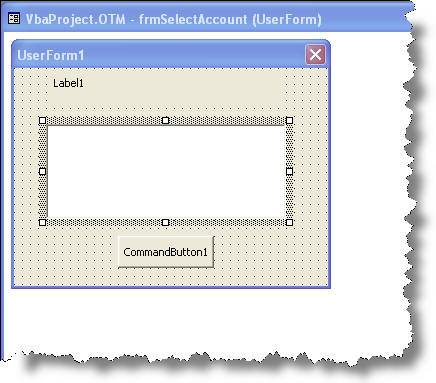
The code associated with the form is as follows:
Private oAccount As Account
Private Sub CommandButton1_Click()
Me.Hide
End Sub
Private Sub UserForm_Initialize()
With Me
.BackColor = &HC0FFFF
.Height = 190
.Width = 240
.Caption = "Send Mail"
With .CommandButton1
.Caption = "Next"
.Height = 24
.Width = 72
.Top = 126
End With
With .ListBox1
'add your list of email addresses
.Height = 71.25
.Width = 174
.Left = 24
.Top = 42
For Each oAccount In Application.Session.Accounts
.AddItem oAccount
Next oAccount
End With
With .Label1
.BackColor = &HC0FFFF
.Height = 24
.Left = 24
.Width = 174
.Top = 6
.Font.Size = 10
.Caption = "Select e-mail account from which to send this message"
.TextAlign = fmTextAlignCenter
End With
End With
End Sub
Private Sub UserForm_QueryClose(Cancel As Integer, CloseMode As Integer)
Set oAccount = Nothing
Unload Me
End Sub
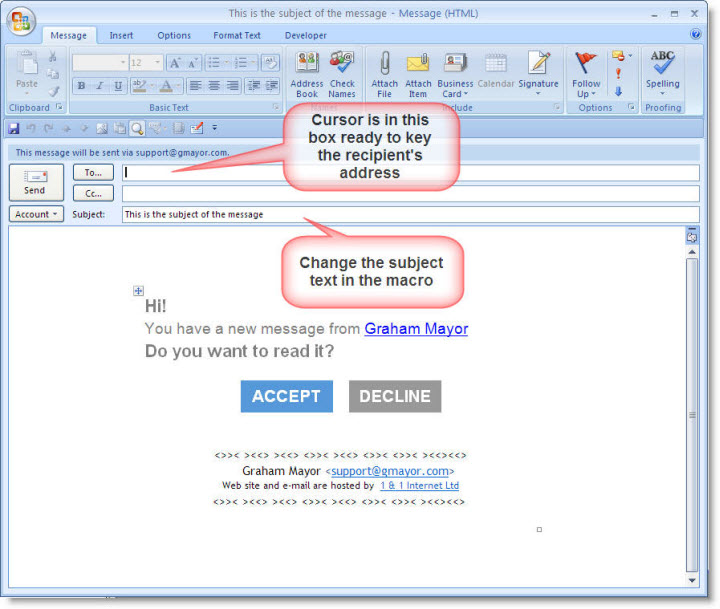
Run the macro, select the sending account from the UserForm (if that option is installed) and the result is as follows: